 Abdul
AbdulThe University of Abuja (UNIABUJA) has officially released its admission list for the 2025/2026 academic session. Candidates who applied for the UTME or Direct Entry programmes can now verify their admission status via JAMB CAPS (Central Admissions Processing System).
This article provides a complete guide on how to check your UNIABUJA admission status, the step-by-step process for accepting your admission on CAPS, important deadlines, and answers to frequently asked questions.
UNIABUJA is a federal university located in the nation’s capital, Abuja. Like all Nigerian universities, admission into UNIABUJA is regulated through JAMB CAPS, which allows candidates to:
- Accept or reject admission offers.
- Track admission status
- Confirm course allocation
The release of the admission list signifies that successful candidates have met the university’s admission requirements, including UTME score, cut-off marks, and post-UTME screening results.
UNIABUJA Admission List 2025/2026 – Key Highlights
- Institution: University of Abuja
- Session: 2025/2026 academic year
- Mode of Checking: Online via JAMB CAPS
- Eligible Candidates: UTME and Direct Entry applicants
- Purpose: Confirm admission, accept or reject offer
How to Check UNIABUJA Admission Status on JAMB CAPS
Checking your admission status is straightforward. Follow the steps below:
Step 1: Visit the JAMB Portal
Go to the official JAMB CAPS page:
👉 https://efacility.jamb.gov.ng/
This portal is the only verified platform to check admission status.
Step 2: Login to Your JAMB Profile
Enter your:
- Email address or JAMB registration number
- Password
Click “Login” to access your profile.
Step 3: Navigate to CAPS
- On your dashboard, click on “Check Admission Status” or “Access CAPS”.
- CAPS will display your current admission status across all courses and institutions you applied to.
Step 4: Check UNIABUJA Admission Status
- Look for University of Abuja in the list of institutions.
- Your status will be displayed as either:
- Admitted ✅
- Not Admitted ❌
Step 5: Accept or Reject Admission
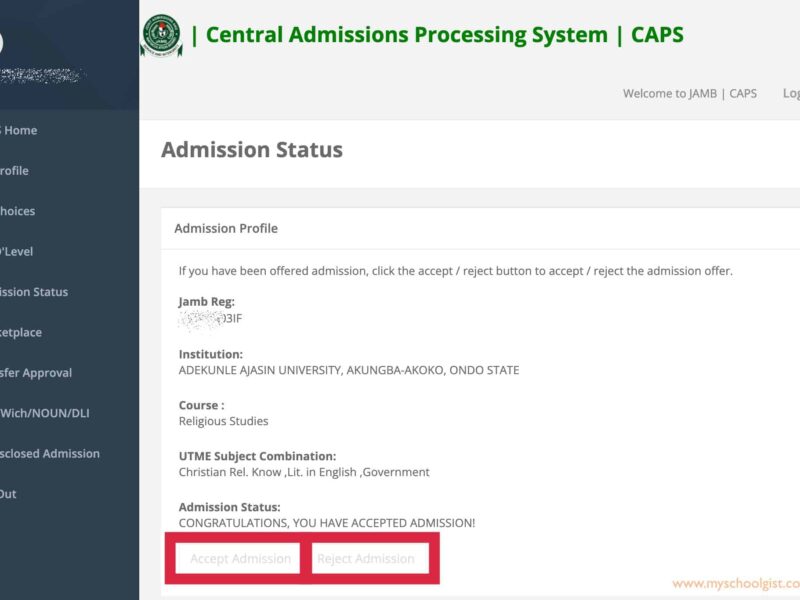
- If you are admitted, click “Accept Admission”.
- If you do not want to take the offer, click “Reject Admission”.
- Acceptance updates your admission status officially and allows UNIABUJA to process your registration.
Steps to Accept UNIABUJA Admission via JAMB CAPS
Once you are offered admission, follow these steps to secure your spot:
- Login to your JAMB profile
- Access CAPS
- Select “Admission Offered” under UNIABUJA
- Click “Accept Admission”
- Print your Admission Acceptance Slip
Note: Accepting admission on CAPS is mandatory to proceed with registration and clearance at UNIABUJA.
Post-Admission Requirements at UNIABUJA
After accepting your admission on CAPS, you are required to complete the following:
1. Print Admission Letter
- Visit the official UNIABUJA portal: https://www.uniabuja.edu.ng/
- Login with your JAMB registration number
- Print your official admission letter.
2. Pay Acceptance Fees
- Acceptance fees are paid through the university payment portal.
- Keep your payment receipt for verification.
3. Prepare Required Documents
For registration, you must provide:
- Admission letter
- JAMB admission printout
- O’Level certificates (WAEC/NECO)
- Birth certificate / declaration of age
- Passport photograph
- Any other documents requested by the department
4. Physical or Online Registration
- Some faculties may allow online registration.
- Others require on-campus verification of documents.
Important: Always confirm with your faculty’s administration office for specific instructions.
Direct Entry Admission at UNIABUJA
Candidates applying via Direct Entry (DE) must:
- Check their admission status on JAMB CAPS.
- Accept or reject admission via CAPS.
- Provide ND/HND certificates or other required credentials.
- Submit DE transcripts during departmental verification.
Important Notes for Candidates
- Do not use unofficial websites – only JAMB CAPS and UNIABUJA portals are verified.
- Do not delay acceptance – admission may be rescinded if not accepted within the deadline.
- Double-check documents – incomplete or fake certificates can result in disqualification.
- Check emails and JAMB profile regularly – UNIABUJA may send additional instructions via email.
Frequently Asked Questions (FAQs)
1. How do I know if I am admitted to UNIABUJA?
Check JAMB CAPS. If your status shows “Admission Offered” under UNIABUJA, you are officially admitted.
2. What if I do not accept the admission on CAPS?
If you do not accept, your admission offer will be considered declined, and UNIABUJA may offer the slot to another candidate.
3. Can I change my course after admission?
Yes, but it must be done before departmental registration and with official approval.
4. How long do I have to accept admission?
Acceptance deadlines vary, but they are usually within 2–4 weeks of the list release. Check official UNIABUJA announcements.
5. Is it possible to check admission without logging in?
No. Admission status is linked to your JAMB registration number and must be checked via CAPS.
Conclusion
The release of the UNIABUJA Admission List for 2025/2026 on JAMB CAPS is a major milestone for applicants. Accepting your admission promptly, preparing your documents, and following university guidelines are essential for smooth registration and course allocation.
Always rely on official portals for accurate information, and avoid unofficial agents or websites claiming to provide “guaranteed admission.” Following this guide ensures you navigate the admission process safely, efficiently, and in compliance with UNIABUJA and JAMB regulations.


 Abdul
Abdul